Single Board Computer
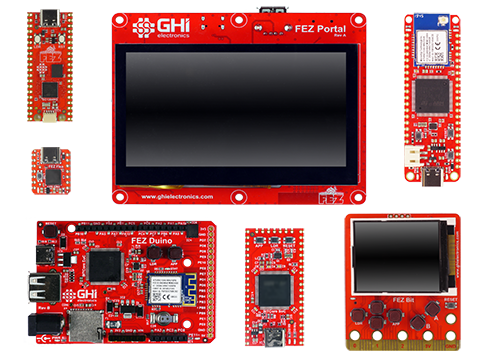
TinyCLR on a ready-to-use board. SITCore SBCs come in maker-friendly form factors — Arduino Uno, Raspberry Pi Pico, Adafruit Feather, BBC micro:bit, Seeeduino Xiao. Plug in USB, open Visual Studio, write C#, deploy. Same TinyCLR runtime, same step debugging — no custom hardware required.
Overview
SBCs are the lowest-friction way to start with TinyCLR. Plug a board into USB, install the firmware, and you're deploying C# from Visual Studio in minutes. Most boards include WiFi out of the box, and all support the complete TinyCLR feature set. Use them for evaluation, prototyping, or as the production hardware in low- to mid-volume products.
All SBCs are built on either the SC20-series or SC13-series SoCs. FEZ Portal is the exception — it's built on an SCM20260N SoM.
Board comparison
| Spec | FEZ Portal | FEZ Bit | FEZ Duino | FEZ Feather | FEZ Stick | FEZ Pico | FEZ Flea |
|---|---|---|---|---|---|---|---|
| Form factor | None | BBC micro:bit | Arduino Uno | Adafruit Feather | None | Raspberry Pi Pico | Seeeduino Xiao |
| Core | SCM20260N | SC20100S | SC20100S | SC20100S | SC20100S | SC13048Q | SC13048Q |
| Speed | 480 MHz | 480 MHz | 480 MHz | 480 MHz | 480 MHz | 80 MHz | 80 MHz |
| Internal RAM | 1 MByte | 1 MByte | 1 MByte | 1 MByte | 1 MByte | 160K | 160K |
| Internal flash | 2 MByte | 2 MByte | 2 MByte | 2 MByte | 2 MByte | 512K | 512K |
| External SDRAM | 32 MByte | — | — | — | — | — | — |
| External flash | 16 MByte | — | 16 MByte | — | — | ✓ | — |
| Display | 4.3″ touch 480×272 | 1.8″ 160×128 | — | — | — | — | — |
| Click connectors | 1 | — | — | — | 2 | — | — |
| WiFi | ✓ | ✓ | ✓ | ✓ | — | — | — |
| Micro SD | ✓ | ✓ | ✓ | — | — | — | — |
| User LED | ✓ | ✓ | ✓ | ✓ | ✓ | ✓ | ✓ |
| Buzzer | ✓ | ✓ | — | — | — | — | — |
| Accelerometer | — | ✓ | — | — | — | — | — |
| User buttons | ✓ | ✓ | ✓ | ✓ | ✓ | — | — |
| USB client | ✓ | ✓ | ✓ | ✓ | ✓ | ✓ | ✓ |
| USB host | ✓ | — | ✓ | — | ✓ | — | — |
| LiPo charger | — | — | — | ✓ | — | — | — |
| Power barrel | — | — | ✓ | — | — | — | — |
| RTC | ✓ | ✓ | ✓ | ✓ | ✓ | ✓ | — |
| GPIO | 45 | 19 | 38 | 31 | 33 | 26 | 11 |
| SPI | 3 | 1 | 2 | 2 | 2 | 2 | 1 |
| I²C | 1 | 1 | 2 | 1 | 2 | 1 | 2 |
| UART | 6 (1 w/ HS) | 3 (0 w/ HS) | 5 (2 w/ HS) | 5 (1 w/ HS) | 2 (0 w/ HS) | 3 (1 w/ HS) | 3 (1 w/ HS) |
| CAN | 2 | 1 | 1 | 1 | 1 | 1 | — |
| PWM | 17 | 8 | 12 | 8 | 6 | 7 | 4 |
| ADC | 10 | 8 | 11 | 6 | 3 | 6 | 6 |
| DAC | 2 | 1 | 2 | 1 | — | 2 | 2 |
| SD/SDIO/MMC | 1 | 1 | 1 | 1 | 1 | — | — |
Many pins share peripherals — not all peripherals will be available simultaneously. Resources are shared between your application and the operating system.
Power consumption
Running totals include all on-board components — display, WiFi, etc.
FEZ Portal
| 480 MHz | 240 MHz | |
|---|---|---|
| Running | 375 mA | 345 mA |
| Idle | 270 mA | 255 mA |
| Sleep | 17 mA | 17 mA |
| Shutdown | 9.7 mA | 9.7 mA |
Display backlight is included when Running and Idle, but off in Sleep and Shutdown. Enabling WiFi adds up to 300 mA.
FEZ Bit
| 480 MHz | 240 MHz | |
|---|---|---|
| Running | 232 mA | 140 mA |
| Idle | 190 mA | 127 mA |
| Sleep | 8.5 mA | 8.5 mA |
| Shutdown | 90 µA | 90 µA |
Display backlight is included when Running and Idle, but off in Sleep and Shutdown. Enabling WiFi adds up to 300 mA.
FEZ Duino / FEZ Feather / FEZ Stick
| 480 MHz | 240 MHz | |
|---|---|---|
| Running | 205 mA | 110 mA |
| Idle | 170 mA | 97 mA |
| Sleep | 6.5 mA | 6.5 mA |
| Shutdown | 40 µA | 40 µA |
Enabling WiFi (when available) adds up to 300 mA. Battery charging on FEZ Feather adds up to 500 mA.
FEZ Pico / FEZ Flea
| 80 MHz | 40 MHz | |
|---|---|---|
| Running | 12.6 mA | 7.5 mA |
| Idle | 6.2 mA | 4.2 mA |
| Sleep | 1.4 mA | 1.4 mA |
| Shutdown | 23 µA | 23 µA |
See the Power Management feature page for details.
USB-C connector
All SITCore SBCs use USB-C for application deployment and debugging. Every USB-A to USB-C cable we've tested works as expected. USB-C to USB-C cables can give inconsistent results, and most USB-C hubs do not work when using USB-C to USB-C cables.
If you have trouble deploying or debugging, connect the board directly to your computer with a USB-A to USB-C cable.
Getting started
SBCs ship ready to run TinyCLR — there's no PCB to design, no bring-up to do.
- Plug the board into your PC with a USB-C cable.
- Install Visual Studio (Community Edition works) and the TinyCLR tooling.
- Update the board's firmware if needed.
- Deploy your first application from Visual Studio.
See Getting Started for the full walkthrough — Visual Studio setup, firmware updates, and first deployment.
FEZ Portal
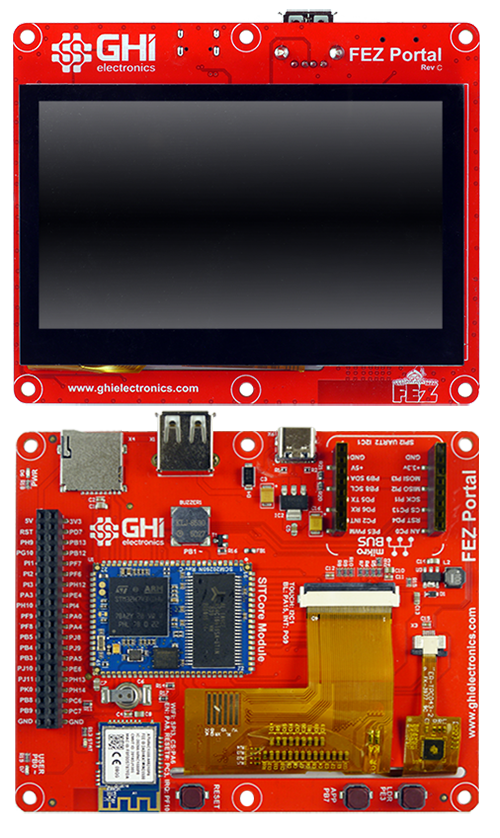
The FEZ Portal is the all-in-one of the lineup — a 4.3″ 480×272 capacitive touch display programmable in C#, built on the SCM20260N SoM. The display and controller are one unit, so adding a touch UI to your product means mounting a single board only slightly larger than the screen itself. Display is part #ER-TFT043-3 from buydisplay.com.
The I²C address on the touch screen controller is 0x38. Use software I²C if another device with the same address needs to be connected.
FEZ Portal Schematic · FEZ Portal 3D STEP File
FEZ Portal peripheral pins
| User LED | PB0 |
| Buzzer | PB1 |
| Display | BL = PA15 |
| Touch I²C = I2C1 | |
| Touch I²C Address = 0x38 | |
| Touch IRQ = PG9 | |
| WiFi | SPI = SPI3 |
| IRQ = PF10 | |
| CS = PA6 | |
| EN = PA8 | |
| RST = PC3 | |
| Buttons | LDR = PE3 |
| APP = PB7 |
FEZ Bit
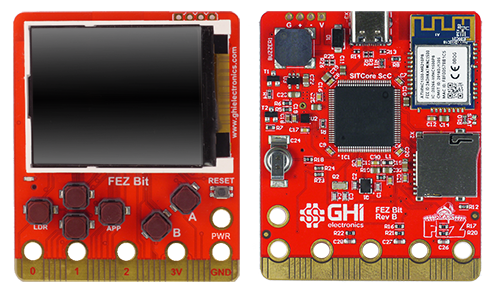
The FEZ Bit uses the BBC micro:bit edge connector to plug straight into the broad micro:bit accessory ecosystem. A convenient way to use those accessories for quickly assembling prototypes or testing new product concepts.
The 3.3V regulator may run hot, especially when WiFi is in use. Add an external 3.3V regulator to eliminate the heat issue. This is required if external components draw more than 10 mA.
FEZ Bit Schematic · FEZ Bit 3D STEP File
FEZ Bit peripheral pins
| User LED | PE11 |
| Buzzer | PB1 |
| Accelerometer | I²C = I2C1 |
| SPI display | SPI = SPI4 |
| BL = PA15 | |
| CS = PD10 | |
| RS = PC4 | |
| RST = PE15 | |
| WiFi | SPI = SPI3 |
| IRQ = PB12 | |
| CS = PD15 | |
| EN = PA8 | |
| RST = PB13 | |
| Buttons | LDR = PE3 |
| APP = PB7 | |
| UP = PE4 | |
| DOWN = PA1 | |
| A = PE5 | |
| B = PE6 | |
| Edge connector | P0 = PC6 (PC2 Analog) |
| P1 = PC7 (PA3 Analog) | |
| P2 = PA0 | |
| P3 = PB0 | |
| P4 = PA4 | |
| P5 = PD13 | |
| P6 = PD12 | |
| P7 = PD11 | |
| P8 = PE8 | |
| P9 = PC3 | |
| P10 = PC0 | |
| P11 = PD1 | |
| P12 = PD0 | |
| P13 = PA5 | |
| P14 = PA6 | |
| P15 = PA7 | |
| P16 = PE7 | |
| P19 = PB8 | |
| P20 = PB9 |
FEZ Duino
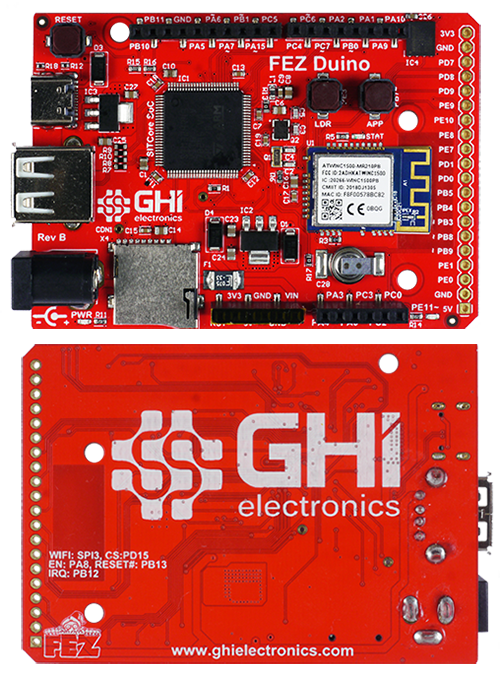
The FEZ Duino uses Arduino Uno female headers, opening up the broad Arduino shield and accessory ecosystem for prototyping and product development.
FEZ Duino Schematic · FEZ Duino 3D STEP File
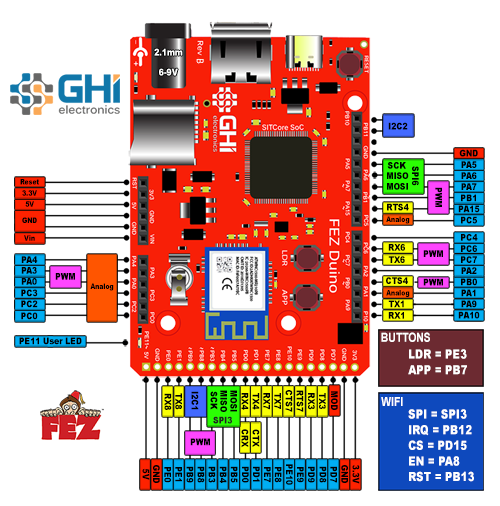
FEZ Duino peripheral pins
| User LED | PE11 |
| WiFi | SPI = SPI3 |
| IRQ = PB12 | |
| CS = PD15 | |
| EN = PA8 | |
| RST = PB13 | |
| Buttons | LDR = PE3 |
| APP = PB7 |
FEZ Duino REV. A & B — the capacitor on the barrel jack is rated 6.3V, but input voltage can reach 12V. Replace with a higher-voltage capacitor or use at your own risk. This affects only the barrel jack — USB power is unaffected.
All boards with a barrel power jack accept a 5.5 × 2.1 mm power plug. Pin is positive, sleeve is negative. Boards accept a wide voltage range but use linear regulators that run hotter with higher input voltages. Recommended input: 6–12 V. For high-current projects, use a lower voltage to keep the regulator cooler. A 1A supply is enough for most needs.
FEZ Feather
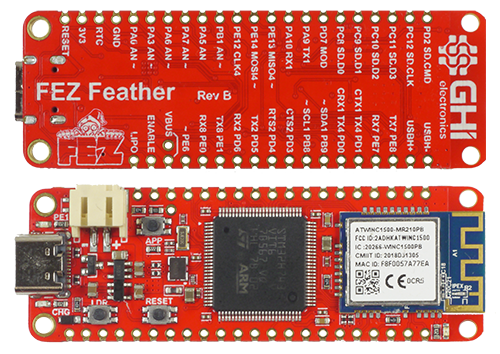
The FEZ Feather uses the Adafruit Feather form factor — stackable, with built-in support for 3.7V LiPo batteries and a charging circuit. Provides both through-hole pads and castellated edges, so the board is breadboard-friendly and easy to integrate into products.
Lithium Polymer (LiPo) batteries are significantly more volatile than other rechargeable batteries. Understand how to properly charge and use them before connecting to the FEZ Feather. Never attempt to charge a damaged or swollen battery. Never leave a battery charging unattended. Improper use can result in fire.
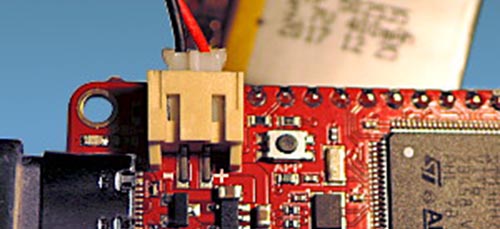
Verify battery polarity before connecting. Reverse polarity will damage the charging circuit, and not all batteries are wired the same way. GHI Electronics is not responsible for, and will not warranty, damage caused by incorrectly connected batteries.
Make sure the battery polarity is correct (red wire to plus, black to minus):
The 3.3V regulator may run hot, especially when WiFi is in use. Add an external 3.3V regulator to eliminate the heat issue. This is required if external components draw more than 10 mA.
FEZ Feather Schematic · FEZ Feather 3D STEP File
FEZ Feather peripheral pins
| User LED | PE11 |
| WiFi | SPI = SPI3 |
| IRQ = PB12 | |
| CS = PD15 | |
| EN = PA8 | |
| RST = PB13 | |
| Buttons | LDR = PE3 |
| APP = PB7 |
FEZ Stick
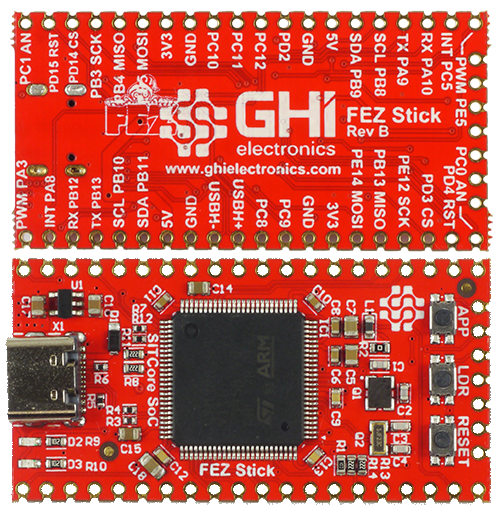
The FEZ Stick is a cost-effective way to start with TinyCLR. Castellated edges and through-hole pads make it both breadboard-friendly and easy to embed into products. Two click module slots make this a flexible board at a low price.
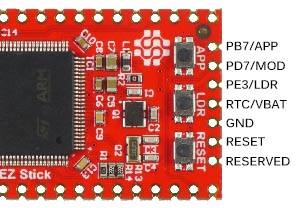
FEZ Stick REV. B — pin PB13 MISO is mislabeled on the silkscreen and should read PE13 MISO.
The on-board 3.3V regulator can supply only 50 mA to external components. If more current is needed, add an additional external 3.3V regulator.
FEZ Stick Schematic · FEZ Stick 3D STEP File
FEZ Stick peripheral pins
| User LED | PE11 |
| Buttons | LDR = PE3 |
| APP = PB7 |
FEZ Pico
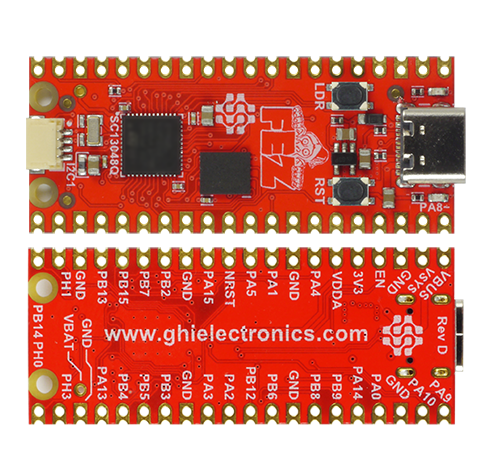
The FEZ Pico uses the Raspberry Pi Pico form factor, dropping into existing Pico accessories. Adds JST connectors compatible with SparkFun Qwiic and Adafruit STEMMA modules for easy expansion.
FEZ Pico Schematic · FEZ Pico 3D STEP File
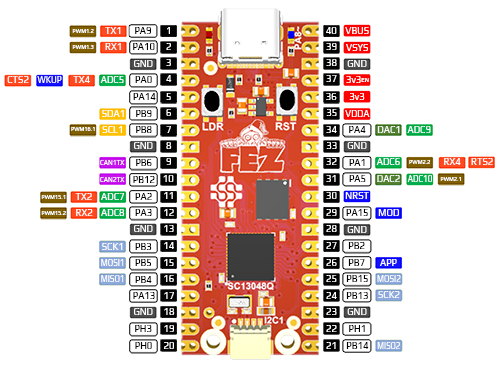
FEZ Pico peripheral pins
| User LED | PA8 |
| Button | LDR = PC13 |
FEZ Flea
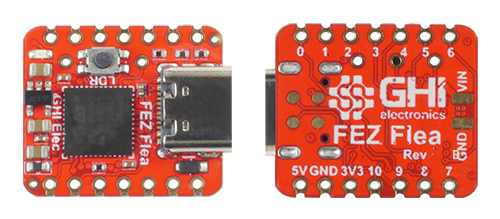
The FEZ Flea is the most cost-effective entry to TinyCLR. The Seeeduino Xiao form factor works with existing Xiao accessories, and castellated edges plus through-hole pins make the board suitable for SoM-style integration or breadboarding.
FEZ Flea Schematic · FEZ Flea 3D STEP File
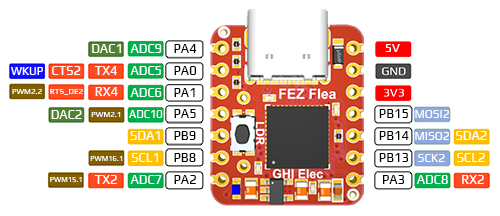
FEZ Flea peripheral pins
| User LED | PA8 |
| Button | LDR = PC13 |
Ordering
| Part number | Description | MSRP |
|---|---|---|
| SCC-FPRTL-C | FEZ Portal SBC | $124.95 |
| SCC-FBIT-B | FEZ Bit SBC | $49.95 |
| SCC-FDNO-B | FEZ Duino SBC | $49.95 |
| SCC-FTHR-B | FEZ Feather SBC | $39.95 |
| SCC-FSTK-B | FEZ Stick SBC | $24.95 |
| SCC-FPICO-D | FEZ Pico SBC | $19.95 |
| SCC-FFLEA-B | FEZ Flea SBC | $14.95 |
All SITCore SBCs are stocked by our global distributors.
See also
- System on Chip — the SC20-series and SC13-series chipsets these boards are built on. Covers startup, firmware loading, and lower-level technical reference that also applies to SBC designs.
- System on Module — the SCM20260 module powering FEZ Portal. Useful if you need a different carrier than the FEZ Portal hardware provides.
- Development Board — full-peripheral evaluation hardware with debug headers. A better fit than an SBC when evaluating TinyCLR for a commercial project.