USB PC Communication
Three protocols built on USB Client for two-way communication between a SITCore device and a PC:
- CDC — virtual COM port, cross-platform, drop-in compatible with anything that opens a serial port.
- WinUSB — Windows-specific, faster than CDC, but the PC side needs custom code.
- WebUSB — Chrome and Edge can talk to the device directly from a web page.
The USB Client page is a prerequisite — it covers the basics of freeing the USB Client port from Visual Studio's debug interface (using the MOD pin to switch debug to serial, or disabling the debug interface entirely via IP Protection).
NuGet package: GHIElectronics.TinyCLR.Devices.UsbClient.
USB CDC
The USB Communications Device Class (CDC) is supported natively by Windows, macOS, and Linux — the PC sees the SITCore as a standard virtual serial port (COM port) and any serial-port app works with it. Windows 10 and later, plus macOS and Linux, load drivers automatically. Older Windows versions may need a driver.
CDC is convenient and cross-platform but is typically limited to about 64 KB/s throughput.
using GHIElectronics.TinyCLR.Devices.UsbClient;
using System.Diagnostics;
using System.Threading;

var usbclientController = UsbClientController.GetDefault();

var usbClientSetting = new UsbClientSetting() {
    Mode = UsbClientMode.Cdc,
    ManufactureName = "Manufacture_Name",
    ProductName = "Product_Name",
    SerialNumber = "12345678",
};

var cdc = new Cdc(usbclientController, usbClientSetting);

cdc.DeviceStateChanged += (a, b) => Debug.WriteLine("Connection changed.");
cdc.DataReceived += (a, count) => Debug.WriteLine("Data received: " + count);

cdc.Enable();

while (cdc.DeviceState != DeviceState.Configured) ;
Debug.WriteLine("USB Client connected");

// Echo loop: read bytes from the PC, add 1 to each, and write them back.
while (true) {
    var len = cdc.Stream.BytesToRead;

    if (len > 0) {
        var dataR = new byte[len];
        var dataW = new byte[len];
        int read = cdc.Stream.Read(dataR);

        for (var i = 0; i < read; i++) {
            dataW[i] = (byte)(dataR[i] + 1);
        }
        cdc.Stream.Write(dataW);
    }
    Thread.Sleep(100);
}
WinUSB
WinUSB is a Windows-only protocol that gives faster throughput than CDC by skipping the virtual-COM emulation layer. On the device side, throughput is limited mostly by how fast your application can process bytes. Windows 10 and later load the WinUSB driver automatically; Windows 7 requires the driver to be installed.
WinUSB has no cross-platform equivalent and requires custom code on the PC to read and write — unlike CDC, which any serial-port application can use without changes.
using GHIElectronics.TinyCLR.Devices.UsbClient;
using System.Diagnostics;
using System.Threading;

var usbclientController = UsbClientController.GetDefault();

var usbClientSetting = new UsbClientSetting() {
    Mode = UsbClientMode.WinUsb,
    ManufactureName = "Manufacture_Name",
    ProductName = "Product_Name",
    SerialNumber = "12345678",
    Guid = "{your guid}",
};

var winUsb = new WinUsb(usbclientController, usbClientSetting);

winUsb.DeviceStateChanged += (a, b) => Debug.WriteLine("Connection changed.");
winUsb.DataReceived += (a, count) => Debug.WriteLine("Data received: " + count);

winUsb.Enable();

while (winUsb.DeviceState != DeviceState.Configured) ;
Debug.WriteLine("USB Client connected");

// Echo loop: read bytes from the PC, add 1 to each, and write them back.
while (true) {
    var len = winUsb.Stream.BytesToRead;

    if (len > 0) {
        var dataR = new byte[len];
        var dataW = new byte[len];
        int read = winUsb.Stream.Read(dataR);

        for (var i = 0; i < read; i++) {
            dataW[i] = (byte)(dataR[i] + 1);
        }
        winUsb.Stream.Write(dataW);
    }
    Thread.Sleep(100);
}
WebUSB
Modern Chromium-based browsers (Chrome, Edge) can talk to USB devices directly from a web page. TinyCLR's CDC and WinUSB drivers already include the descriptors needed for WebUSB to find the device — no special TinyCLR firmware mode required.
The TinyCLR-WebUSB repo has two example apps to flash onto the device: WebUSBApp (WinUSB-style) and SerialWebUSBApp (CDC-style). Once loaded, open the demo page in Chrome or Edge:
- WinUSB: ghi-electronics.github.io/TinyCLR-WebUSB
- CDC: ghi-electronics.github.io/TinyCLR-WebUSB/serialwebusb.html
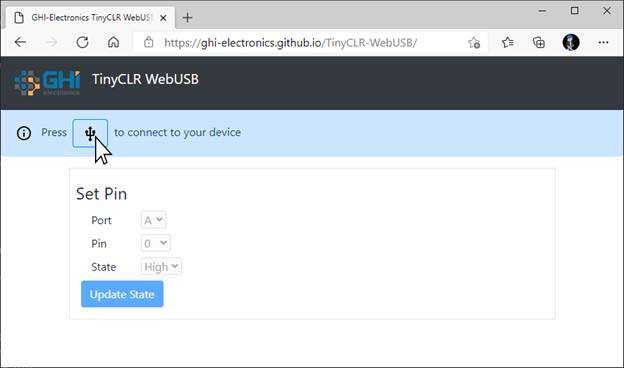
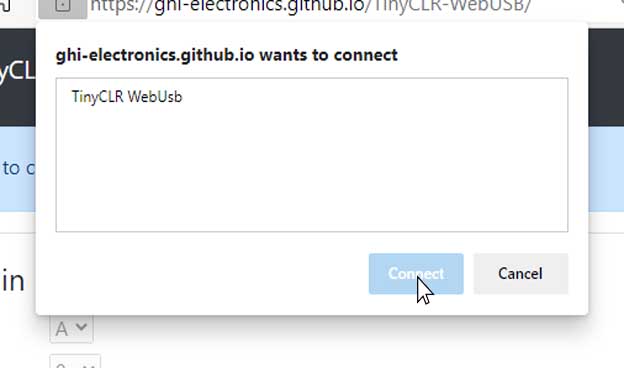
The browser will show a Connect button. Pick TinyCLR WebUsb from the device list:
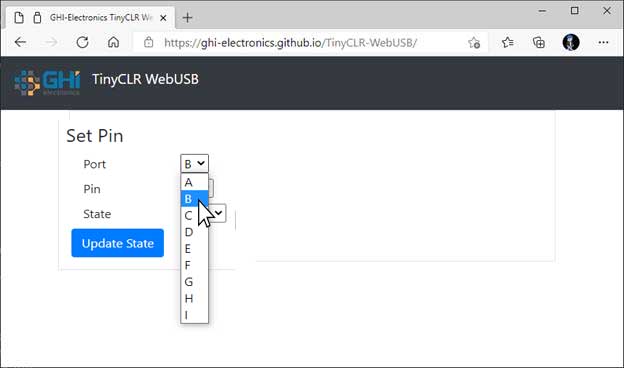
Once connected, the page's controls become active:
Clicking Update State sends the request to the device, which responds with the result:
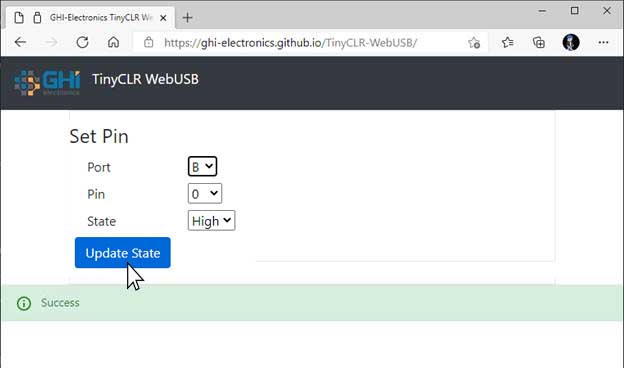
In the screenshot above, PB0 was set HIGH and the on-board LED turned on:
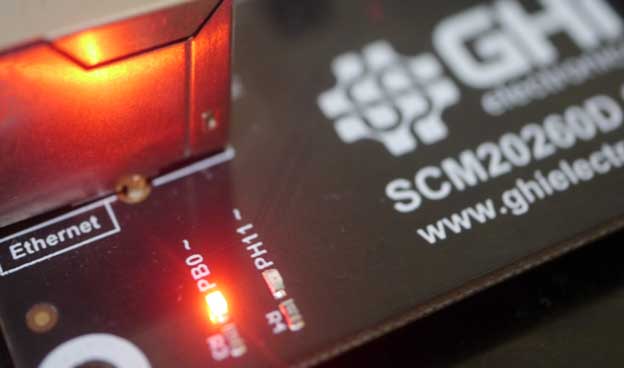
WebUSB works by knowing the device's USB endpoints. TinyCLR's CDC and WinUSB drivers use fixed endpoint numbers, so the JavaScript side initializes the class with hard-coded values:
let webusb = new WebUSB(2, 1);
This line lives in webusb.js in the demo repo.
API reference
| Namespace | Description |
|---|---|
| GHIElectronics.TinyCLR.Devices.UsbClient | USB CDC and virtual serial port classes |