Microsoft Azure
The example below connects to Azure IoT Hub over MQTT — the standard transport for device-to-cloud messaging on Azure. You'll need an active network connection on the device (see WiFi, Ethernet, or cellular via PPP) before the code runs.
NuGet packages: GHIElectronics.TinyCLR.Networking.Mqtt and GHIElectronics.TinyCLR.Drivers.Azure.SAS (the SAS driver builds the shared-access-signature password Azure uses for authentication).
What you'll need from Azure
Create these in the Azure portal before flashing:
- IoT Hub — gives you the broker hostname
{hub}.azure-devices.net. - Device identity — registered under the hub. Gives you the
deviceIdand a primary key. - Root CA certificate — Azure IoT Hub currently uses DigiCert Global Root G2. Download it from Microsoft's certificate documentation and add it to your project resources.
Microsoft's Send telemetry to Azure IoT Hub tutorial walks through the portal setup.
Azure rotates its TLS root certificate periodically. If you're shipping devices long-term, plan for an in-field firmware update path so you can deploy a new root CA when Microsoft rotates. The current root is DigiCert Global Root G2; older Baltimore CyberTrust Root devices needed an update around early 2023.
Connecting and publishing
using System;
using System.Diagnostics;
using System.Security.Authentication;
using System.Security.Cryptography.X509Certificates;
using System.Text;
using GHIElectronics.TinyCLR.Drivers.Azure.SAS;
using GHIElectronics.TinyCLR.Native;
using GHIElectronics.TinyCLR.Networking.Mqtt;

// Load the Azure root CA from project resources — see the section above
// for which root certificate Azure currently uses.
var caCert = new X509Certificate(Resources.GetBytes(Resources.BinaryResources.AzureRootCA));

var iotHubName = "your-hub.azure-devices.net";
var iotHubPort = 8883;

const string deviceId = "your-device-id";
const string apiVersion = "2021-04-12";       // Azure IoT Hub MQTT API version.

// Azure requires the api-version parameter in the MQTT username.
var username = iotHubName + "/" + deviceId + "/?api-version=" + apiVersion;

// SAS tokens are time-bound. Make sure the device's clock is correct
// (within ~5 minutes of real UTC) — sync it from a time server or
// pass it from a connected gateway. The hardcoded date below is illustrative only.
SystemTime.SetTime(DateTime.UtcNow);

var sas = new SharedAccessSignatureBuilder() {
    Key = "your-primary-key",
    KeyName = null,                       // null for device-scoped SAS (use device primary key).
    Target = iotHubName + "/devices/" + deviceId,
    TimeToLive = TimeSpan.FromHours(1),   // Keep token TTL short and renew as needed.
};

// MQTT topics for Azure IoT Hub.
var topicDeviceToCloud = "devices/" + deviceId + "/messages/events/";
var topicCloudToDevice = "devices/" + deviceId + "/messages/devicebound/#";

try {
    var clientSetting = new MqttClientSetting {
        BrokerName = iotHubName,
        BrokerPort = iotHubPort,
        ClientCertificate = null,
        CaCertificate = caCert,
        SslProtocol = SslProtocols.Tls12,
    };

    var client = new Mqtt(clientSetting);

    client.PublishReceivedChanged += (sender, topic, data, duplicate, qos, retain) => {
        Debug.WriteLine("Received on " + topic + ": " + Encoding.UTF8.GetString(data));
    };

    var connectSetting = new MqttConnectionSetting {
        ClientId = deviceId,
        UserName = username,
        Password = sas.ToSignature(),
    };

    var returnCode = client.Connect(connectSetting);

    if (returnCode != ConnectReturnCode.ConnectionAccepted)
        throw new Exception("Connect failed: " + returnCode);

    ushort packetId = 1;

    // Subscribe to cloud-to-device messages.
    client.Subscribe(new[] { topicCloudToDevice }, new[] { QoSLevel.ExactlyOnce }, packetId++);

    // Publish a device-to-cloud telemetry message.
    client.Publish(topicDeviceToCloud, Encoding.UTF8.GetBytes("Your message"), QoSLevel.AtMostOnce, retain: false, packetId++);
}
catch (Exception ex) {
    Debug.WriteLine("Azure connect/publish failed: " + ex.Message);
    throw;
}
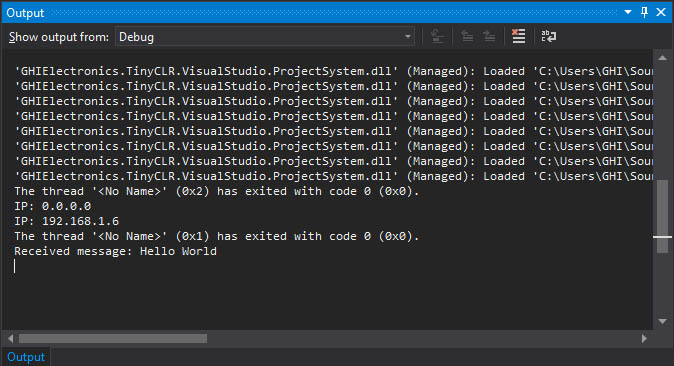
Messages sent from the Azure side land in PublishReceivedChanged:
Notes
- API version — bump
apiVersionwhen Microsoft publishes a newer one with features you need. Older API versions continue to work but may be deprecated over time. Check Microsoft's MQTT support reference for the current value. - Time sync is mandatory — SAS tokens carry an expiration timestamp validated by Azure against its current UTC. A device with a clock that's hours off from real time will get its tokens rejected. Set the clock at startup from a time source (NTP server, cellular network, or pass-through from a connected gateway).
- Provisioning at scale — for fleets, consider the Azure IoT Hub Device Provisioning Service (DPS) instead of hand-registering each device. DPS uses the same MQTT flow but provisions the IoT Hub assignment dynamically.
API reference
| Namespace | Description |
|---|---|
| GHIElectronics.TinyCLR.Networking.Mqtt | MQTT client classes |