Codec Drivers
Codec drivers handle audio and video formats — MP3 decoding via an external chip, WAV playback through the built-in DAC, and MJPEG video frame-by-frame decoding.
See also: Audio Playback and MJPEG Video for the higher-level feature reference.
VS1053B
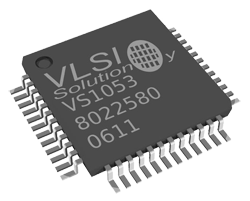
External MP3 decoder chip from VLSI Solution. The SITCore streams MP3 bytes over SPI; the VS1053B does the decoding and drives the audio output directly.
NuGet package: GHIElectronics.TinyCLR.Drivers.VlsiSolution.VS1053B.
The example below plays a small MP3 from a project resource on the SC13048 Dev Board. The same pattern works for large MP3 data read from an SD card, USB drive, or network stream.
var gpio = GpioController.GetDefault();
var dreq = gpio.OpenPin(SC13048.GpioPin.PA4);
var reset = gpio.OpenPin(SC13048.GpioPin.PB15);
var dataChipSelect = gpio.OpenPin(SC13048.GpioPin.PA0);
var commandChipSelect = gpio.OpenPin(SC13048.GpioPin.PB2);
var spi = SpiController.FromName(SC13048.SpiBus.Spi1);

var mp3decoder = new VS1053BController(spi, dreq, reset, dataChipSelect, commandChipSelect);
var mp3Bytes = Resources.GetBytes(Resources.BinaryResources.Song);

mp3decoder.SetVolume(250, 250);
mp3decoder.SendData(mp3Bytes);
WAV
WAV playback via the built-in DAC — see the Audio Playback page for the higher-level pipeline.
NuGet package: GHIElectronics.TinyCLR.Drivers.Media.
The example below plays an 8-bit mono WAV file with an 8 kHz sample rate on the SC20100S Dev Board (DAC on pin PA4). The WAV file must be saved as a .BIN file before adding it as a resource.
var dac = DacController.GetDefault();
var analogOut = dac.OpenChannel(SC20100.DacChannel.PA4);

var byteFile = Resources.GetBytes(Resources.BinaryResources.yourWavFileResource);

var wavFile = new Wav(byteFile);
var dataIndex = wavFile.GetDataIndex();
var size = wavFile.GetDataSize();
var sampleRate = wavFile.GetSampleRate();

if (sampleRate == 8000) {
    for (int i = dataIndex; i < size; i++) {
        analogOut.WriteValue(byteFile[i]);

        for (int timer = 0; timer < 58; timer++) { }     // Crude delay loop to match 8 kHz rate.
    }
}
else {
    Debug.WriteLine("File doesn't have an 8 kHz sample rate.");
}
MJPEG
MJPEG is a sequence of JPEG frames concatenated into one stream — see MJPEG Video for the format details.
NuGet package: GHIElectronics.TinyCLR.Drivers.Media.
var stream = new FileStream(@"A:\128x160.mjpeg", FileMode.Open);

var settings = new Mjpeg.Setting {
    BufferSize = 16 * 1024,
    BufferCount = 3,
};

var mjpegDecoder = new Mjpeg(settings);
mjpegDecoder.FrameDecodedEvent += MjpegDecoder_FrameDecodedEvent;

mjpegDecoder.StartDecode(stream);       // Non-blocking — frames arrive via the event.

Thread.Sleep(Timeout.Infinite);

void MjpegDecoder_FrameDecodedEvent(byte[] data) {
    using (var image = new Bitmap(data, 0, data.Length, BitmapImageType.Jpeg)) {
        if (graphic != null) {
            graphic.DrawImage(image, 0, 0, image.Width, image.Height);
            graphic.Flush();
        }
    }

    GC.WaitForPendingFinalizers();      // Help free large frame buffers between frames.
}