CAN
Controller Area Network (CAN) is a serial bus with built-in error checking and retransmission, commonly used in automotive and industrial systems. The wiring is typically two differential wires (CAN-H and CAN-L); the bus needs a 120 Ω termination resistor at each end.
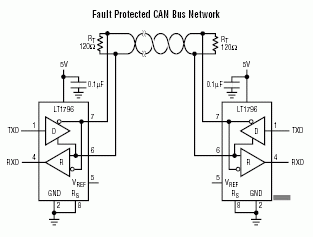
Endpoint uses Iot.Device.SocketCan.CanRaw from .NET IoT for the
actual send/receive. The only Endpoint-specific step is calling
CanController.Initialize(port, bitrate) first, which muxes the port's
TX/RX pins and brings the canN interface up at the chosen bitrate.
- .NET
- Python
- C/C++
using System.Device.Can;
using Iot.Device.SocketCan;
using GHIElectronics.Endpoint.Core;

// Bring up CAN1 at 500 kbit/s
CanController.Initialize(EPDomino24.Can.Can1, bitrate: 500_000);

// Send a frame with the standard .NET IoT API
using var can = new CanRaw(EPDomino24.Can.Can1);
can.WriteFrame(new byte[] { 11, 22, 33 }, new CanId { Standard = 0x123 });
Python has no Endpoint CAN device package: use python-can for the
I/O. Endpoint only has to claim the port's pins and set the bitrate
with CanController.Initialize.
import can
from GHIElectronics.Endpoint.Core import EPDomino24, CanController

# Bring up CAN1 at 500 kbit/s
CanController.Initialize(EPDomino24.Can.Can1, 500_000)

# Send a frame with python-can
with can.Bus(interface="socketcan", channel=EPDomino24.Can.Can1) as bus:
    bus.send(can.Message(arbitration_id=0x123, data=[11, 22, 33],
                         is_extended_id=False))
#include <array>
#include <cstdint>
#include <endpoint/CanController.h>
#include <endpoint/EPDomino24.h>

using namespace GHIElectronics::Endpoint::Core;
using namespace GHIElectronics::Endpoint::Devices::Can;

// Bring up CAN1 at 500 kbit/s
CanController::Initialize(EPDomino24::Can::Can1, 500'000);

// Send a frame
CanRaw can(EPDomino24::Can::Can1);
can.WriteFrame(std::array<uint8_t, 3>{11, 22, 33}, CanId{.Standard = 0x123});
Read frames in a loop:
- .NET
- Python
- C/C++
using var can = new CanRaw(EPDomino24.Can.Can1);
while (true) {
    var data = new byte[8];
    if (can.TryReadFrame(data, out int length, out CanId id)) {
        Console.WriteLine($"ID=0x{id.Value:X3} len={length} data={BitConverter.ToString(data, 0, length)}");
    }
}
with can.Bus(interface="socketcan", channel=EPDomino24.Can.Can1) as bus:
    for message in bus:
        print(f"ID=0x{message.arbitration_id:X3} len={message.dlc} "
              f"data={message.data.hex('-')}")
CanRaw can(EPDomino24::Can::Can1);
while (true) {
    std::array<uint8_t, 8> data{};
    int length = 0;
    CanId id;
    if (can.TryReadFrame(data, length, id)) {
        std::printf("ID=0x%03X len=%d\n", id.Value(), length);
    }
}
When you are done, release the port's pins:
- .NET
- Python
- C/C++
CanController.UnInitialize(EPDomino24.Can.Can1);
CanController.UnInitialize(EPDomino24.Can.Can1)
CanController::UnInitialize(EPDomino24::Can::Can1);
CanController is chip-neutral; the same call works on any supported
module. The port constant (EPDomino24.Can.Can1) is board-specific and
lists only the ports actually bonded on EP-Domino24.